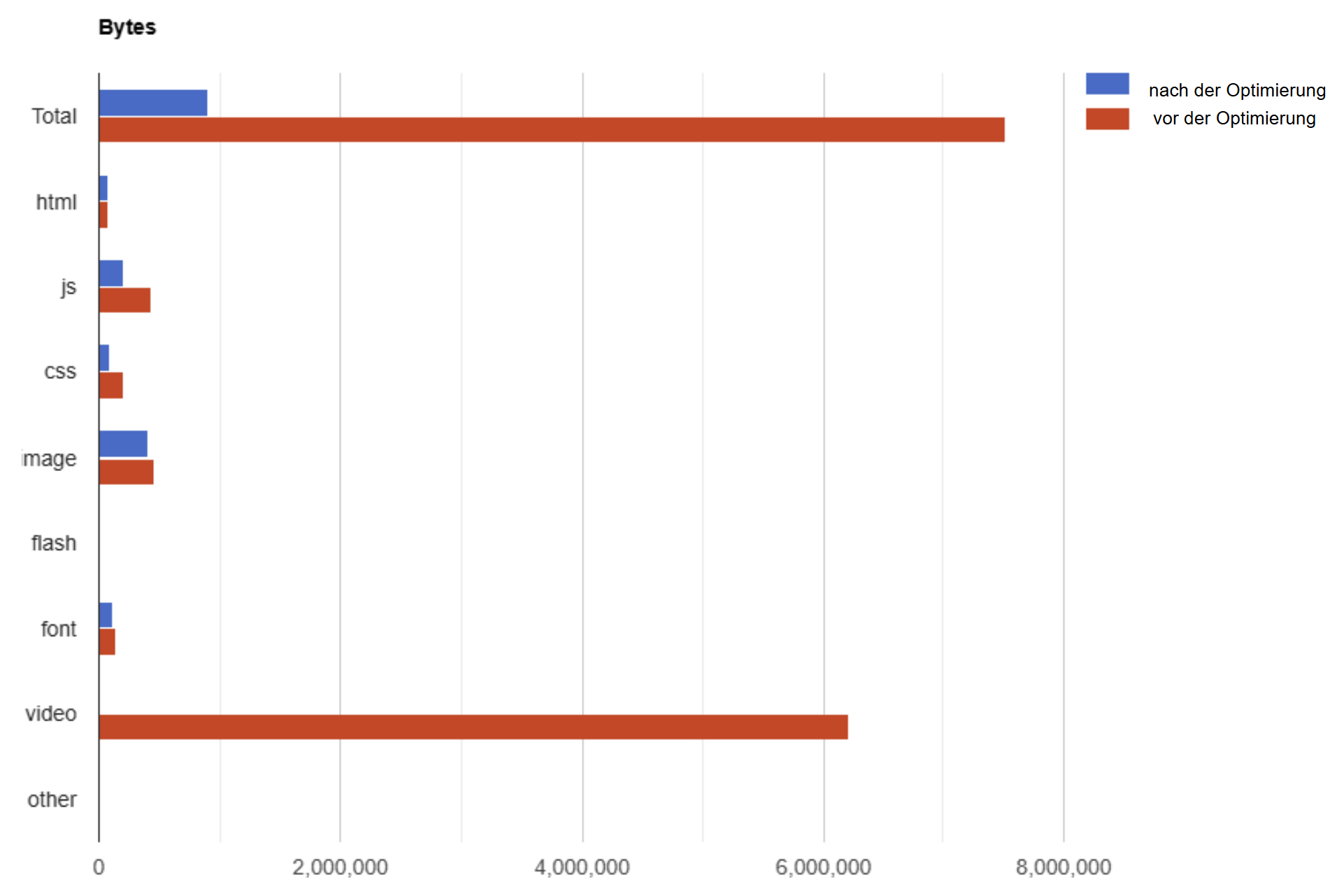
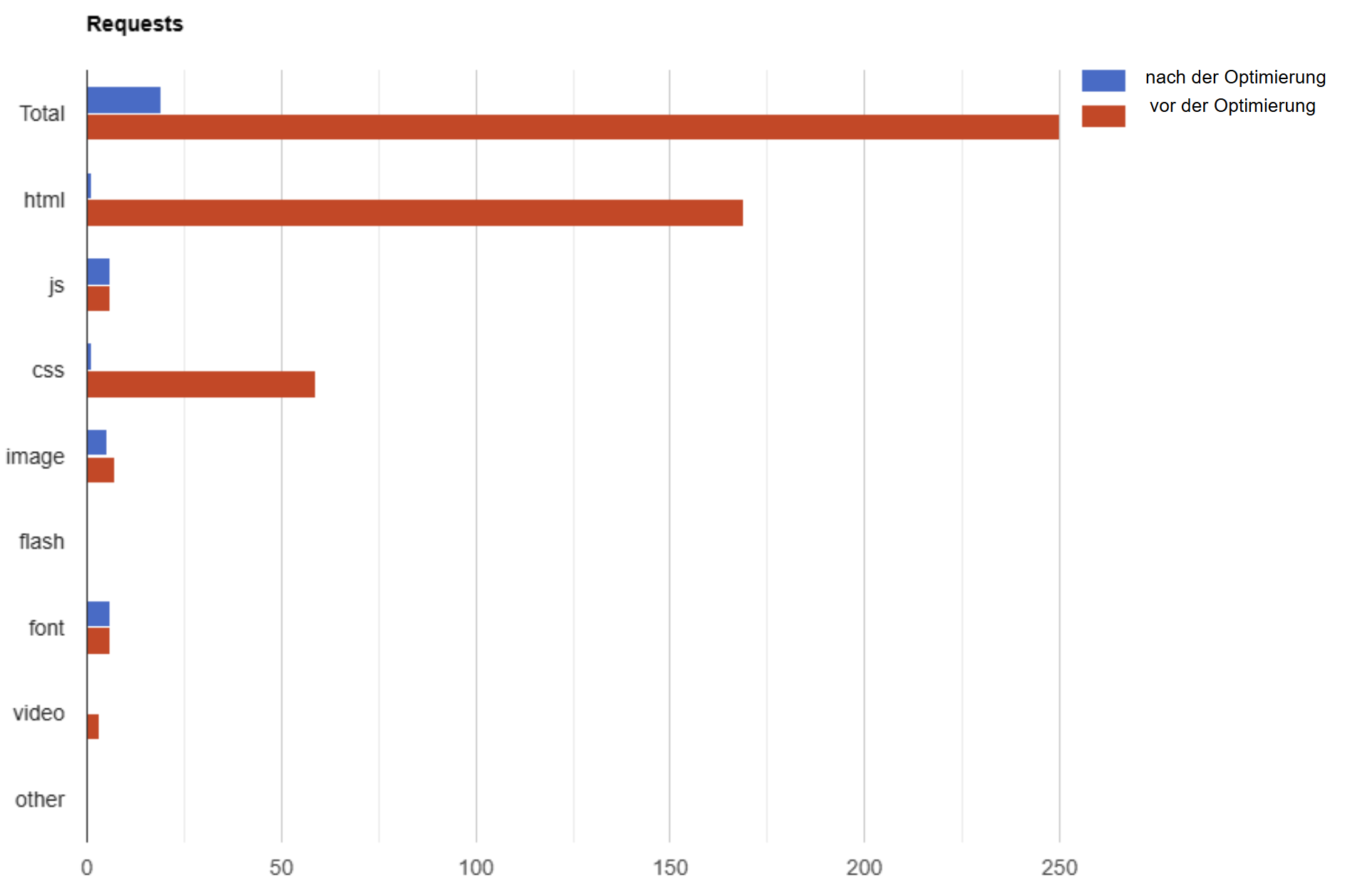
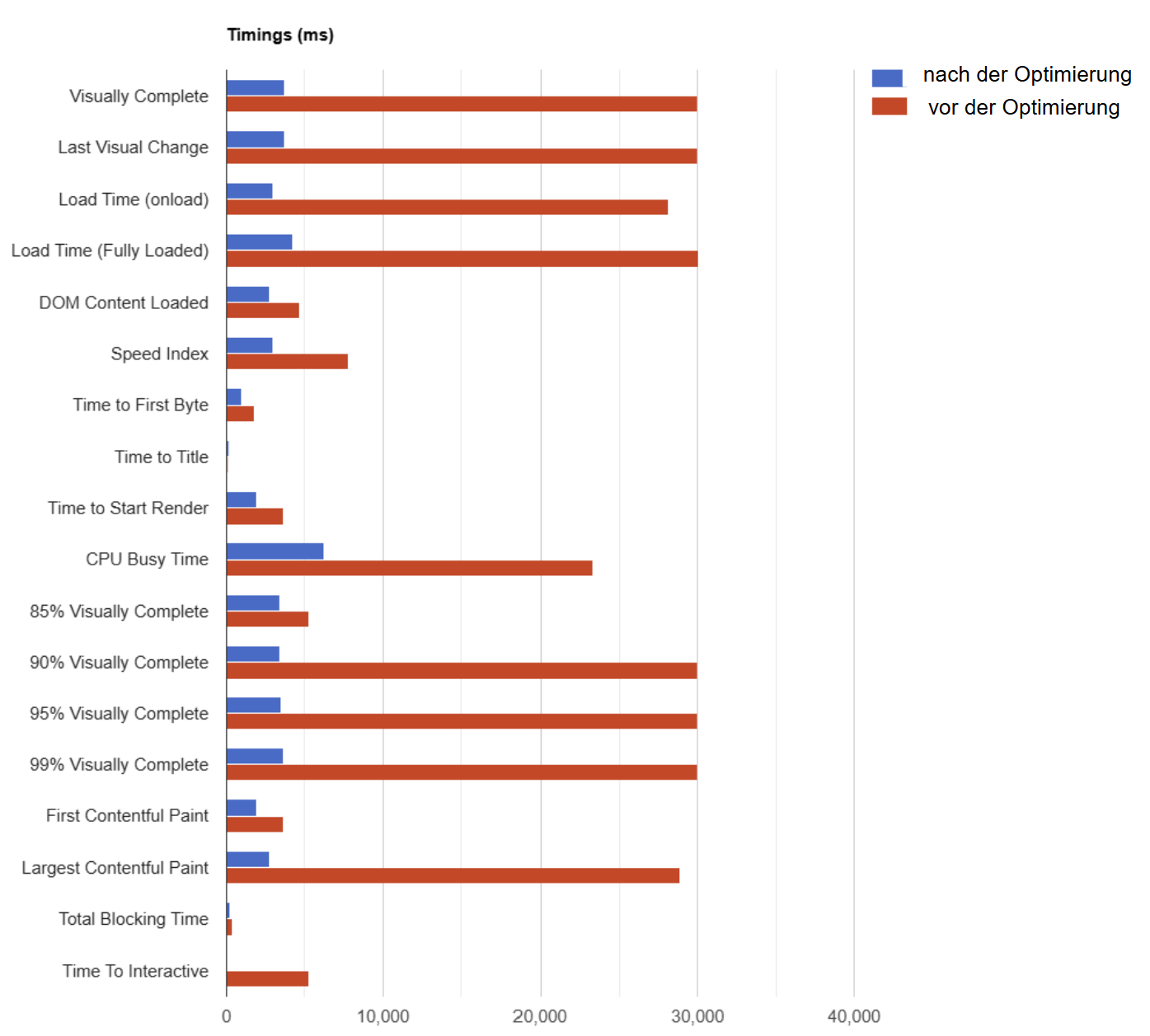
Load Time Optimization

Fast websites
are more successful.

Analysis and consulting for optimizing Google PageSpeed, loading times, and (Core) Web Vitals.

Audit
Detailed KPI measurement & analysis - incl. Web Vitals, loading time & PageSpeed. Concrete measures, prioritized to-dos & quick wins for rapid improvements.
Is your website too slow? Detailed analysis & concrete measures for quick improvements.
Commission an audit now
Specification
Detailed fine specification of concrete measures, priorities & technical tickets. Code snippets, screenshots & validation tools for smooth implementation.
Clearly defined to-dos for developers - with code snippets, screenshots & best practices for direct implementation
Define measures
Consulting
Individual consulting for load time optimization - from PageSpeed analysis to CDN strategy. Flexible hourly model, direct exchange with IT & quality control.
Use my expert knowledge flexibly: I accompany you during the optimization - from the analysis to the acceptance of the implementation.
Book a consultation

Load time optimization: Benefits of a particularly short load time

High online sales

A well-known study has determined that a website that is just one second slower corresponds to a drop in the conversion rate of a whopping 7%. A fast website is therefore essential for successful lead generation and online sales.

Top Google Rankings

Google officially confirmed back in 2010 that the PageSpeed Score is an important ranking factor. The top ranking pages often have a particularly short server response time. Since June 2021, Core Web Vitals have also been evaluated in the Google ranking.

Low bounce rate

A fast loading time results in a low bounce rate and satisfied users who return and make repeat purchases. A comprehensive and effective performance optimization can significantly reduce the bounce rate.

Best user experience

A short loading time is an important prerequisite for a good user experience (UX). UX signals are considered an important ranking factor by Google. Due to the steadily increasing use of smartphones in mobile networks, as little data as possible should be transmitted to ensure good performance.

Common causes of poor website performance

External services

Tracking, live chats, integration of external ratings, Google Maps maps, CRM forms and many other third-party services often ensure that websites become slower and slower during operation. In most cases, new services are continuously integrated without paying attention to the loading time, the UX and the Google PageSpeed Score of the individual websites.

Uncompressed media

In particular, images in old and uncompressed image formats, which have also not been adapted for different screen resolutions, are a frequent cause of performance problems. Modern image formats such as WebP or AVIF combine very high compression rates with very good image quality.

Non-optimized script resources

JavaScript and CSS files are often not compressed and summarized. A lot of websites have a variety of such resources. By combining and compressing such files, the requests can often be reduced enormously, which in turn leads to a significantly lower overall loading time and a better user experience.

Old PHP and HTTP version

Especially websites that have been online for many years often use an outdated PHP version (< PHP 8) or an old HTTP protocol (HTTP/1.1). By updating this technical server infrastructure, a significant improvement in performance can be achieved for site visitors.

Missing or poorly configured website caching

If all pages of a website are always generated dynamically when the user calls up the page, then the loading time is considerably longer than if all pages are already preloaded as a static HTML version on the server. A well-configured cache ensures a short server response time (TTFB / Time To First Byte).

Missing text compression

Text-based resources (e.g. web documents) should be provided in compressed form in order to minimize the total number of bytes. This is often not the case for all resources. Brotli is the most efficient. GZIP should be used as a fallback for Brotli. GZIP is supported by all common browsers. Text compression is activated in the configuration of the web server.

PageSpeed optimization: Optimal process for a fast website

01

Analysis

Comprehensive measurement of website loading times, derivation and prioritization of optimization measures.

02

Specification

Specification of the measures and entry of tickets in the ticket system for the implementing developers.

03

Optimization

Implementation of the necessary optimizations by the developers and acceptance of the implementation.

04

Monitoring

Continuous monitoring and reporting of the loading time and, if necessary, re-optimization of the website.

Web Performance Consulting

Audit

KPI measurement, analysis, derivation of todos
990
additional page/template: +450 €
  • Detailed performance measurement for 1 page/template
  • Definition of target values for all relevant KPIs
  • Analysis of PageSpeed, Web Vitals & loading time
  • Derivation of optimization measures
  • Prioritization of recommendations according to impact & effort
  • Quick wins for rapid improvement
  • Status quo visualization
  • Presentation of results via video call or telephone
Fixed price

Specification

Detailed specification of the measures
Cost estimate possible after audit
  • Derivation of concrete measures
  • Creation of technical tickets
  • Definition of loading time target values
  • Provision of code snippets & screenshots
  • Compilation of helpful resources
  • Use of validation tools & methods

Consulting

Web Performance Consulting
115 €/Std.
Fixed hourly quota or flexible fee/hour
  • PageSpeed, Web Vitals & Load Time Optimization
  • Benchmarking / competitive analysis
  • Quality control: Acceptance of the implementation
  • Direct exchange with the IT department
  • CDN strategy & implementation
  • Real-time monitoring with RUM (Real User Monitoring)

Load time optimization: Professional page speed consulting

Web Performance Consultant Christian Schreiber
Christian Schreiber, Web Performance Consultant

PageSpeed optimization: Advantages of short loading times

Specialist articles on the topic of web performance

Understanding the 75th percentile of Core Web Vitals

Why the 75th percentile is crucial for your Core Web Vitals Fast loading times and a good user experience are crucial for the success of a website. This is where the Core Web Vitals come into play, which measure the user-friendliness of your site. But how exactly do you assess

The Cost of Doing Nothing (CODN): Why slow websites cost sales

The Cost of Doing Nothing (CODN): Why slow websites cost sales Companies invest large budgets in online marketing – but lose potential sales every day because their websites are too slow. The “Cost of Doing Nothing” (CODN) approach shows that inactivity in the area of web performance optimization is not

Increase AI visibility through web performance optimization

Machine intelligence meets web performance In the age of digital transformation, the influence of web performance is no longer limited to search engine optimization (SEO). With the emergence of the concept of Generative Engine Optimization (GEO), it has become clear that the performance of a website also has a direct

Frequently asked performance questions explained clearly

A good
mobile
score is achieved from a value of 90/100.

How complex it is to optimize loading times to achieve such a good score depends on many factors, for example: Server hardware, number and media format of the page elements (texts, images, videos), number of externally integrated scripts and much more.

The Core Web Vital user data from the Google CrUX dataset is much more important than the optimization of the score, because real user experiences are considered here. An analysis with Google PageSpeed Insights is always just a single simulation (synthetic analysis).

The Google PageSpeed Score is often mistakenly equated with the loading time. However, this is measured in seconds and must also be taken into account when optimizing performance. A high Google PageSpeed Score does not necessarily always correlate with a short loading time.

Der Google PageSpeed Score ist kein Rankingfaktor, die Core Web Vitals (LCP, INP, CLS) schon. Google measures the Core Web Vitals (CWV) by users of the Chrome browser. This field data determined by Google are important for the SEO ranking. The CWV of the last 28 days are included in the Google ranking as a ranking factor in the so-called Page Experience. In addition to the CWV, mobile-friendliness, security and the correct handling of dialog fields are also important.

In addition, a short loading time increases user satisfaction, ensures more sales and fewer bounces. The optimization of Google PageSpeed, Web Vitals and loading times is therefore a very important topic both for a good user experience (UX) and for search engine optimization (SEO).

Web pages should be fully loaded in the web browser within a maximum of 3 seconds to ensure optimal loading time. Any delay beyond this time frame can lead to a significant increase in the bounce rate and affect the user experience. Studies show that users often leave a page that takes longer than 5 seconds to load in frustration. This not only has a negative impact on the user experience, but can also lead to a loss of sales and a reduction in lead generation. Therefore, an efficient load time is crucial to increase visitor engagement and maximize the success of your website.

Before starting the detailed specification of the optimization measures, a well-documented initial measurement of the website load time, the Google PageSpeed Score and the Core Web Vitals is created. This makes it easy to carry out new site measurements during the optimization process and also at the end and to show the success of the measures transparently.

It is also advisable to set up a monitoring and reporting dashboard that uses automatic alerts to provide information on the change status of the most important KPIs. In addition to synthetic tests, performance monitoring should also measure the end user experience using Real User Monitoring (RUM). A RUM tool measures the real user experience with the website, which can lead to a direct improvement in the conversion rate.

There are many optimization measures for improving website performance, Google PageSpeed Score and Core Web Vitals, all of which contribute to both short loading times and a better user experience with the respective website.

The following list is only an excerpt of potential improvements:

  • High-performance hosting
  • Compression, summarization and outsourcing of JavaScript and CSS code
  • Removal of unused script files and JS passages
  • Removal of unused CSS code
  • Provision of resources (CSS, JS) for different types of applications. Page types/templates
  • Provide Critical Path CSS for the immediately visible area of the page
  • Eliminate render blocking JS and CSS
  • Activate HTML compression and remove HTML comments
  • Optimize HTML DOM, avoid deep nesting of elements
  • Asynchronous loading of JavaScript code (async / defer)
  • Use of the HTTP/2 protocol to be able to load more resources in parallel
  • Activate website caching
  • Use browser caching
  • Use GZIP or Brotli compression
  • Compress images
  • Image dimensioning (provision of images without scaling)
  • Set image sizes for all images to ensure good visual stability
  • Provide WebP or AVIF format for images and fallback in the original format on the server
  • Lazy loading for images, videos and iframes that are not in the initial viewport
  • Provide video formats for animated content
  • Preloading the LCP image with high priority
  • Preconnection to external font servers
  • Text visibility during the loading process
  • Use passive listeners
  • Reduce external scripts
  • Use of fast server hardware
  • Use of a CDN (Content Delivery Network) for fast international availability

The status quo must always be determined before optimization. An audit should be created for this purpose, from which the corresponding todos are then derived. A comprehensive consultation with a specialized PageSpeed agency always brings to light many potentials that are recommended for a fast website.

The effort required to implement performance optimization varies greatly because it depends on the initial state of the content management system, the content (images, media, etc.) and the system itself. Although the WordPress CMS is easy to optimize, it is often overloaded by the use of many plugins and overloaded themes, which makes loading time optimization necessary.

Optimizing website load times can be a challenge due to various complex issues:

1. browser compatibility: Different browsers interpret and render websites differently, which can lead to inconsistent loading times. Optimization must target a wide range of browsers and devices to ensure a consistent user experience.

2. dynamic content: Websites with dynamic content that is frequently updated can cause difficulties with load time optimization. The complexity of database queries, content management systems and server-side scripts can affect loading times.

3. third-party resources: The integration of third-party scripts for analytics, advertising, social media widgets, etc. can have a negative impact on loading times, as they can generate additional HTTP requests and increase page render time.

4. resource transfer: The transfer of resources such as images, CSS, JavaScript and fonts from servers to user devices can take different amounts of time depending on network speed, latency and bandwidth, which affects loading times.

5 Server configuration and hosting infrastructure: The performance of the server on which a website is hosted, as well as the configuration of server software and caching mechanisms, can have an impact on loading times. An inefficient server configuration or an overloaded hosting infrastructure can lead to slow loading times.

6 Mobile devices and network conditions: Optimizing loading times for mobile devices is a particular challenge, as they often have slower network connections and less computing power than desktop computers. Mobile websites need to be specially optimized to load quickly and provide a good user experience.

Tackling these complex issues requires a comprehensive understanding of web technologies, careful planning and implementation of optimization strategies, and regular monitoring and adjustment to ensure the best possible performance.


Various industries can struggle with slow websites, especially those that rely heavily on online commerce or the provision of digital services. Some industries that may frequently face slow websites are:

1. e-commerce: Online stores and e-commerce websites, especially those with extensive product catalogs and many images, can suffer from slow loading times, resulting in a poor shopping experience and deterring potential customers.

2. news and media: Websites of news agencies, online magazines and media companies need to deliver content in real time, which can lead to a large amount of dynamic content that can affect loading times, especially with heavy traffic.

3. travel and tourism: Websites of tour operators, hotels, airlines and other tourism companies often have to provide large amounts of information and images, which can lead to slow loading times, especially if they are not properly optimized.

4. healthcare and online services: Hospital, medical practice and online healthcare websites often need to provide sensitive information and services in real time, which can result in slow load times if they do not have sufficient server capacity or optimization.

5. financial services: Websites of banks, insurance companies and other financial institutions must ensure that sensitive transactions and financial information are loaded quickly and securely in order to gain and maintain the trust of users.

In these industries, it is crucial that websites load quickly and reliably to increase user satisfaction, improve conversion rates and boost customer confidence. Optimizing loading times is therefore an important priority for companies in these sectors.

Regardless of the content management system (CMS) used, performance optimization can be carried out for all websites. These can be, for example, the popular CMS WordPress, Drupal, Adobe Experience Manager, Joomla, Craft or TYPO3, as well as the leading eCommerce systems such as WooCommerce, Shopify or Magento.

Very few CMSs are already so fast by default that the loading time could not be shortened further.

A consultation on load time optimization always begins with an initial, non-binding initial discussion. This allows, for example, the project objectives, scope, timeline for improving speed, project budget and roles in the project to be clarified.

The next step is a comprehensive audit using various tools to optimize loading times for each page template/page type in order to identify all potential for speeding up the pages. The findings from the audit are then usually presented to the technical manager or the marketing team and the responsible developers. Through the joint exchange, initial questions about the feasibility of the measures can be clarified straight away.

Some potential improvements require detailed specification. This is usually either incorporated into an (SEO) concept or the specification is made directly within tickets for agile implementation by the web developers.

The ticket system (often Atlassian Jira, Redmine, etc.) can then be used by the developers to ask questions before or during implementation. The web performance specialist can also confirm the successful implementation of the individual tickets via the system.

To ensure that performance does not deteriorate again after the initial optimization, it is always advisable to use a web performance monitoring system.

Page performance should be monitored using a Real User Monitoring (RUM) tool, as this allows individual user sessions to be recorded in real time. These are then stored anonymously in sessions so that data protection regulations are complied with and users cannot be traced. Personal data is not collected with this type of tracking.

Google collects real user data via the Chrome browser to evaluate the loading speed. The metrics LCP (Largest Contentful Paint), FID (First Input Delay) and CLS (Cumulative Layout Shift) are recorded. However, this data is stored in aggregated form, which is why the individual user experience can no longer be evaluated (e.g. a single access from a distant country and a mobile data network).

The data is publicly accessible to everyone, but is delivered with a delay of 28 days. The user experience can be viewed, for example, in the Google PageSpeed Insights field data report, can be accessed via a Google API and can also be viewed in the Google Search Console. In order to retrieve this information for your own website, you need a certain number of hits. Otherwise, either no data or only data for the domain origin (usually the start page) is available.

So if you only rely on the Chrome User Experience Report (CrUX) in your own monitoring, you can only react very late to a poor user experience. Nevertheless, CrUX data is important because it has an impact on ranking success.

Individual queries and evaluation of the laboratory data (synthetic measurements) from Google PageSpeed Insights do not represent meaningful monitoring of the loading time. These are user simulations, which is why this type of measurement is useful for staging instances and during the optimization of loading times, but not during operation.

This depends entirely on the initial situation and the complexity of the website. I do not carry out any technical implementation myself, but accompany the optimization process in an advisory capacity – with a clear focus on strategy, analysis and quality assurance.

The duration depends primarily on how quickly the development team implements the recommended measures. My PageSpeed audit is completed within 3 to 5 working days. In it, I identify all relevant braking factors such as:

  • poorly compressed images,

  • blocking resources (JavaScript, CSS),

  • missing caching header,

  • bad Time to First Byte (TTFB),

  • or problems with the Core Web Vitals (LCP, INP, CLS).

If you wish, I can then support you or your team during implementation – for example with code reviews, follow-up measurements and tool recommendations. The speed of the entire process then depends heavily on how well it is developed internally or externally and how many iterations are required.

The aim is not only to achieve better PageSpeed values, but to integrate them sustainably into your development processes.

I do not offer technical implementation, but concentrate entirely on PageSpeed audits, strategic consulting and the accompanying optimization in exchange with your development team.

The price for a comprehensive PageSpeed audit incl. individual recommendations for action is € 990 net . This includes a precise analysis of all relevant metrics (including Core Web Vitals), concrete proposals for measures with prioritization and a debriefing in which we plan the next steps together.

If you would also like ongoing support or technical quality assurance during implementation (e.g. over several sprints), I would be happy to offer you a customized consulting package.

Transparency is important to me – with me you know right from the start what service you will receive and what it will cost.

In practice, I repeatedly see the same errors that prevent a good loading time – even on technically professionally built websites. The most common problems are

  • Images without optimization: Image formats that are too large, lack of compression or outdated formats such as JPEG instead of WebP or AVIF.

  • Non-prioritized JavaScript: Unnecessary third-party scripts (tracking, chat, widgets) block the display and significantly worsen the INP value.

  • No consistent caching: Both at server and browser level, resources are often reloaded every time a page is called up – completely unnecessary.

  • Render blocking resources: CSS and JS files are loaded synchronously, which significantly slows down the loading time, especially on mobile devices.

  • Lack of technical focus: Many optimizations are only aimed at “green values in PageSpeed Insights” – without improving the actual user experience.

Another mistake is that optimization is often thought of as a one-off. Performance must be integrated into the development process, otherwise new problems will creep in with every new release.

My aim is to identify such pitfalls at an early stage, make clear recommendations and guide your team through the optimization process in a targeted manner – in a technical, structured and measurable way.

I use a combination of laboratory data and field data for the analysis because only both together provide a realistic picture. The Google PageSpeed Insights tool is suitable for an initial assessment – it shows both core web vitals from real user experiences and laboratory data under defined conditions.

I also use tools such as WebPageTest, Lighthouse, Chrome DevTools or GTmetrix to analyze the loading time granularly – e.g. according to the principle: What blocks the visible area, what is loaded unnecessarily multiple times, what can be prioritized or lazyloaded?

The decisive factor is that loading speed is not just a value in seconds, but a combination of technical structure, user perception and sensible resource management. One of the things I look at when measuring:

  • Time to First Byte (TTFB)

  • First Contentful Paint (FCP)

  • Largest Contentful Paint (LCP)

  • Interaction to Next Paint (INP)

  • Cumulative Layout Shift (CLS)

  • as well as classic metrics such as the number of HTTP requests or the size of the DOM

The goal: to understand what counts for real users.

The Core Web Vitals are a set of three key performance metrics that Google has introduced to evaluate the actual user experience when loading a website. They are part of the ranking factors – those who optimize them not only improve their visibility, but also the satisfaction of visitors.

In detail it is about:

  • LCP (Largest Contentful Paint): Measures how quickly the largest visible content (e.g. image, text block) is loaded. Target: less than 2.5 seconds.

  • INP (Interaction to Next Paint): Replaces the FID key figure since 2024 and evaluates how quickly the page reacts to interactions – e.g. clicks or input. Target: under 200 milliseconds.

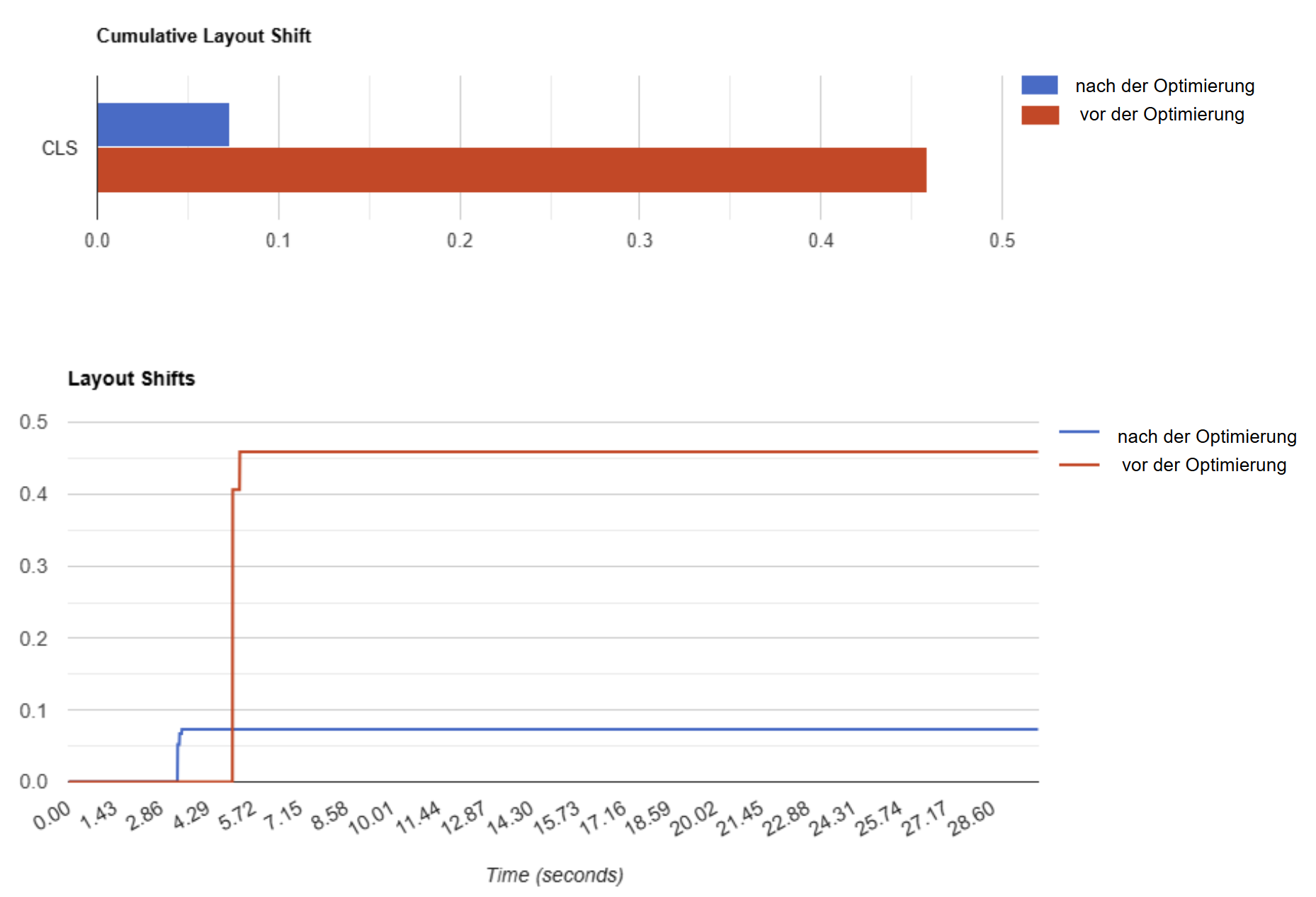
  • CLS (Cumulative Layout Shift): Measures the visual stability. Jumps in the layout (e.g. reloaded ads) lead to poor values here. Target: below 0.1.

Google measures these values not only in laboratory tests, but also using real user data in the Chrome browser. That’s what makes them so important: they reflect how your site feels in practice – and that’s exactly what flows into the ranking.

I analyze and optimize these key figures in a targeted manner so that your website becomes faster, more stable and more interactive – and performs better on Google.

For me, the focus of every PageSpeed optimization is a very clear goal: to measurably reduce the loading time and noticeably improve the user experience. This not only brings technical advantages, but also has a direct impact on visibility, user behavior and conversion.

The most important goals are:

  • Better Google ranking: Loading time is a confirmed ranking factor – especially on mobile. Those who are faster are more visible.

  • Fewer bounces: A fast-loading page reduces the bounce rate. Studies show that if the loading time increases from 1 to 3 seconds, the bounce rate increases by up to 32%.

  • Higher conversion rate: Whether store, lead form or newsletter – the faster the page responds, the more likely it is to convert.

  • Mobile optimization: Every millisecond counts, especially on mobile. This is where the wheat is separated from the chaff in the Core Web Vitals.

  • More efficient crawling: Faster pages enable Googlebot & Co. to capture more content in less time.

PageSpeed is not an end in itself – but a means to become more visible, more user-friendly and more successful.

When I analyze loading times, I almost always find the same “speed killers”. Conversely, there are a number of tried and tested levers that can be used to specifically improve performance:

  1. Image optimization: Modern formats such as WebP or AVIF, suitable dimensioning, compression without loss of quality.

  2. Resource management: Reduce, combine or asynchronously load JavaScript and CSS – especially in the above-the-fold area.

  3. Caching: Use browser and server caching in a targeted manner to avoid burdening returning visitors with unnecessary requests.

  4. Server performance: Slow time to first byte (TTFB)? Then it’s worth taking a look at hosting, CDN or server-side rendering.

  5. Lazy loading: Only load content when it is really needed – e.g. images, videos or embedded content.

  6. Minimization of HTTP requests: fewer external resources, optimized DOM, combined styles and scripts.

  7. Improve core web vitals in a targeted manner: So LCP, INP, CLS – ideally take them into account at the design stage.

I help you not only to recognize these levers, but also to translate them into clear tasks for your development team – practical, prioritized and with a clear target value.

In concrete terms: better rankings, satisfied users and more conversions. An optimized loading time has a direct positive effect in several areas:

  • More visibility on Google: Loading speed is an official ranking factor – especially on mobile devices. Those who are faster rise in the competition for the best places.

  • Better user experience: Your website responds faster, loads more stably and feels more modern. This increases dwell time and reduces bounces.

  • Higher completion rates: Every second counts – in e-commerce and with lead forms. Fast websites convert better.

  • Technical sustainability: Optimizing loading times strengthens your technical basis – less server load, more efficient processes, better scalability.

  • Clarity in the code: PageSpeed optimization often also ensures tidy, maintainable and better structured code.

I focus on making the potential behind the numbers tangible – so that optimization doesn’t just remain a technical topic, but becomes a clear business lever.

The collaboration is deliberately lean, focused and geared towards technical clarity. I accompany you not as a developer, but as a technical specialist for performance and PageSpeed, who analyzes, prioritizes and strategically advises.

The process usually looks like this:

  1. Audit & analysis: I check your website with professional tools (PageSpeed Insights, Lighthouse, WebPageTest, etc.) and identify all relevant performance brakes.

  2. Concrete recommendations for action: You receive a comprehensible report with prioritized measures – tailored to your infrastructure and your goal (e.g. improve core web vitals, mobile optimization, optimize crawling).

  3. Support & quality assurance: On request, I can support your development team during implementation, e.g. through code reviews, monitoring or coordination with agencies.

  4. Post-measurement & reporting: Once the implementation is complete, I check the success with a before/after comparison – both technically and in terms of SEO potential.

There are no long contract periods and no agency set-up – You work directly with me. Sure. Technical. Targeted.